
Automated event & speaker promo videos
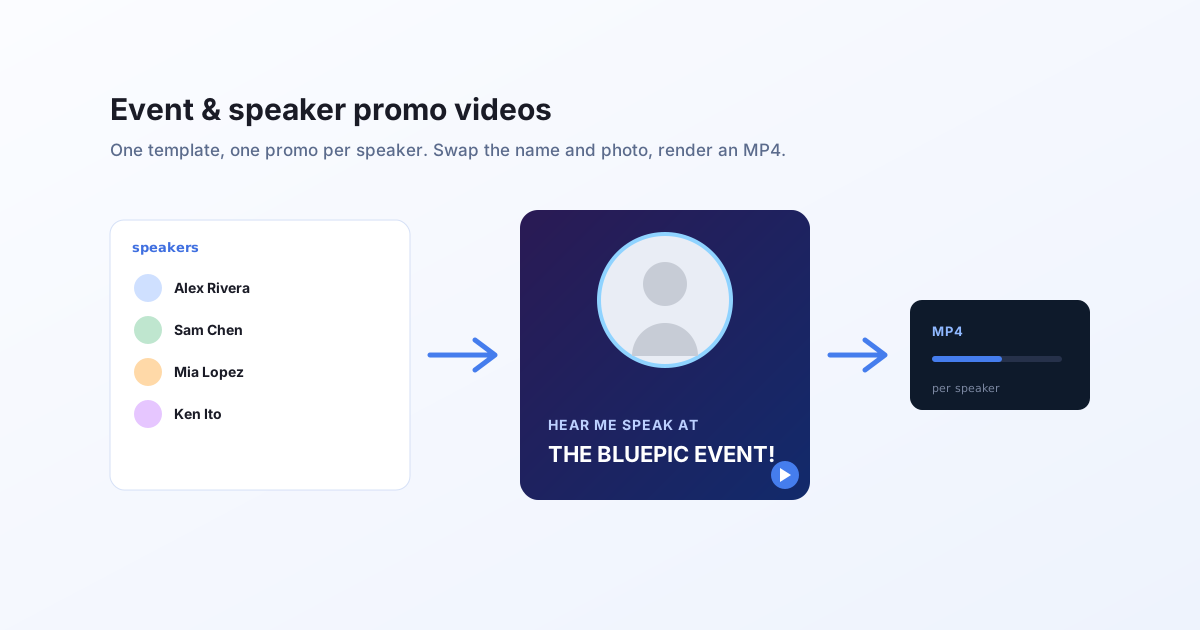
Every speaker, sponsor, and session deserves an on-brand promo clip. Design the promo once as a reactive template, feed it your line-up, and render one personalized MP4 per person. No per-clip editing, no off-brand drift.
The problem with promo season
A conference with 40 speakers needs 40 promos, often in two or three aspect ratios, in a week.
It does not scale by hand
Every speaker means opening a design file, swapping the photo and name, exporting, repeating. Forty times, per format.
It drifts off-brand
Manual edits creep: a wrong font, a nudged logo, an inconsistent crop. The set stops looking like one campaign.
It arrives late
The design queue is the bottleneck, so speaker promos ship in dribs and drabs instead of all at once at announcement.
How it works with Bluepic
Design the promo once
Build one animated promo template in Studio: the branded background, the speaker photo, and the text lines, with the photo and text connected as input fields.
Feed your line-up
Point the render at your speaker list, a spreadsheet, a CMS, or your event platform's API. Each row carries a name, a photo, and a session title.
Render one MP4 per speaker
Send one request per row. Each returns a hosted, on-brand promo clip, ready to post or hand to the speaker.
A concrete example
This is the exact call behind the promo on the video playground. The inputs are a photo and two lines of text:
curl -N -X POST "https://api.bluepic.io/api/render" \
  -H "Authorization: <your API key>" \
  -H "Content-Type: application/json" \
  -d '{
    "templateId": "<your promo template>",
    "data": {
      "image4_image": { "src": "https://…/alex.jpg" },
      "text2_text": "HEAR ME SPEAK AT",
      "text1_text": "THE BLUEPIC EVENT!"
    },
    "format": "mp4"
  }'
Loop it over your speaker list to render the whole line-up in one pass. See batch animate videos.
Why a template beats one-off edits
On-brand by construction
The layout, fonts, and colours live in the template. Only the data changes, so every promo in the set matches.
Every ratio, same data
Build a square and a vertical version of the promo and render both from the same speaker list for feeds and stories.
Stills that match the clip
The same template renders a still speaker card by switching the format, so your static and motion assets stay consistent.
Turn your line-up into promos
Build the template once, render the whole roster from data.